

Current Burning Permissions
Open burning—or burning outdoors—is allowed when the wildfire risk is low and can be a useful tool when conducted responsibly. Open burning includes Category 1 campfire, Category 2, and Category 3 open fire.
Receive critical alerts about this and other emergencies in the Cowichan region by subscribing to Cowichan Alert. Cowichan Alert informs subscribers of major emergencies or disasters in the Cowichan region that may impact you. Subscribers may also opt to receive non-emergency notifications related to local government services. Signing up is easy and can be done from your mobile phone, tablet, or computer. There is no fee to sign up.
The EMC Evacuee Portal can be installed to your phone as a web app! Once installed, you can subscribe to receive live updates of changes to this portal as push notifications to your phone. That means when we update resources or news here, you will be notified immediately to your subscribed devices.
Choose your device to view appropriate install instructions for your phone.
Open Safari on your iPhone and visit https://emcowichan.ca/
Tap the “Share” icon in the bottom centre of Safari.
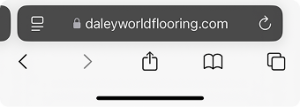
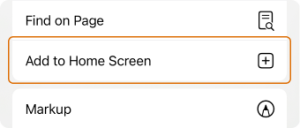
Scroll down, find “Add to Home Screen,” and tap it.
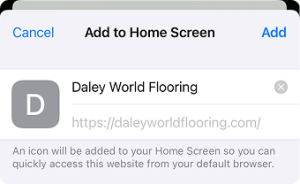
When the pop-up shows up, hit “Add” or “Done”
The app is now on your Home screen.
Open the app and select “Subscribe to Notifications”
Open Google Chrome on your Android device and visit https://emcowichan.ca/
Tap the three-dot menu icon (⋮) in the top right corner of the screen.
Tap “Add to Home screen” (on some devices, this might say “Install app”).
When the pop-up shows up, tap “Add” or “Install”.
The app is now on your Home screen.
Open the app and select “Subscribe to Notifications”


